> For the complete documentation index, see [llms.txt](https://features.sstrader.com/sstrader-tutorials/llms.txt). Markdown versions of documentation pages are available by appending `.md` to page URLs; this page is available as [Markdown](https://features.sstrader.com/sstrader-tutorials/creating-new-models/pre-match-filter.md).
# Pre Match Filter
The Prematch filter allows you to monitor Prematch metrics, or statistics that are available before the start of a match. You can use this filter in combination with Live stats to create powerful models.
There are several options available in the Prematch filter, including:
* Average for the season FOR the team
* Season average AGAINST the team (goals conceded, for example)
* Overall (including cups and friendlies)
* Only for the League FOR and AGAINST (scored/ conceded)
* Season Probability for Goals (scored (For) and conceded (against)
* Total Goals Probability
* Probability of Corners for the Season and Total
These options are divided into different categories to allow for more detailed analysis, taking into account factors such as different lineups used in cups, different motivations, and more.
Here are some examples of how you might use the Prematch filter:
* You might want to find matches where the Season Average for the home team is between 1 and 2 goals in their last 6 games.
Or the Average Shots on Goal for "Both Teams" is 5 or more between 75 and 90 minutes in the last 6 matches.
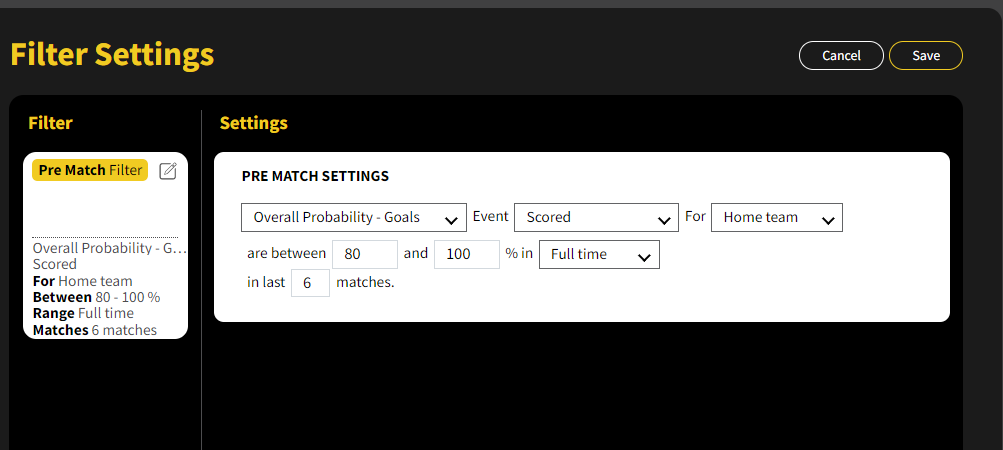
Alternatively, you might be looking for a host team that has scored in at least 80% of their last 6 matches.