> For the complete documentation index, see [llms.txt](https://features.sstrader.com/sstrader-tutorials/llms.txt). Markdown versions of documentation pages are available by appending `.md` to page URLs; this page is available as [Markdown](https://features.sstrader.com/sstrader-tutorials/sstrader-it/creating-new-models/odds-filter.md).

# Odds Filter

## Odds Filter

Puoi utilizzare questo filtro sia per i mercati Pre Match che Live, e puoi anche confrontare le quote di chiusura con le quote Live.

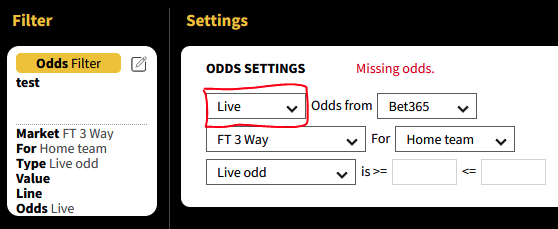
&#x20;Per iniziare, seleziona il mercato che ti interessa, come gli eventi in diretta. Quindi scegli un bookmaker, come Bet365, per monitorare i parametri scelti.

<figure><img src="https://lh5.googleusercontent.com/fw51hbIsMUEhX2qVrb4SjtiJhNf4IDAFogmkw4tyERx8urET7gPWz4MyNH1JPUX0c_O1lU-3j5hmcmi531cFYKzgUmM_Z73CM3LpnrPca78mSwGPXxzAyQjWMm81sQG3IjyWF20A3OngIzJkqGLgT1_psywyVsVDHOslXhPWz4bVytbVRFm3ZYGwHCxGhg" alt=""><figcaption></figcaption></figure>

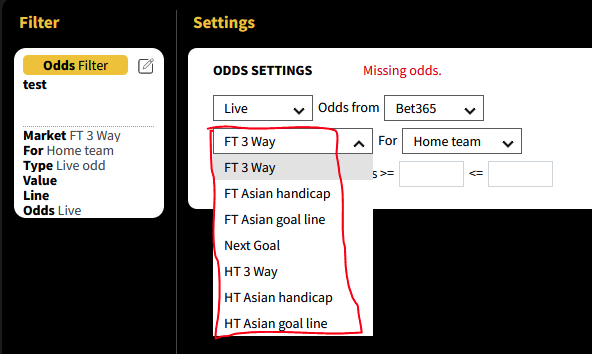
Da lì, puoi scegliere quali quote seguire, come le quote del tempo pieno, il handicap asiatico del tempo pieno e altro ancora.

<figure><img src="https://lh6.googleusercontent.com/N_Fb7NOiol15crrMo_pNIxzYQqrnJEiE8h6hf-0ibmMdPaKjeEVHIai1XymXFghGeKtrwvMzSDs7igxg4PQy6-tMvvrR3Mdv6Ul7_KLM2hTSvzcXhKdjxNImCmft54202KXzIZjB8TlDBKkl95MiRS600r80cL1H-_zdA01RK9FQmialcs-tVIaNopyWXg" alt=""><figcaption></figcaption></figure>

<br>

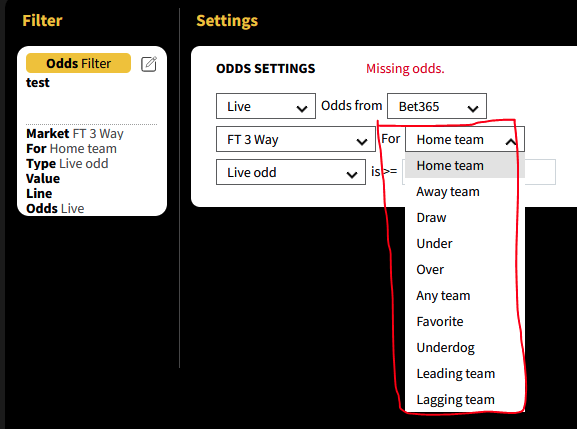
Puoi anche scegliere la selezione che vuoi seguire, come le quote per la squadra di casa, la squadra ospite, il pareggio, il favorito, l'underdog, la squadra che conduce e quella che ritarda.

<figure><img src="https://lh6.googleusercontent.com/oLSazCBLXIGYUf9ReN5gK5UUO_OkJk2sRkDn_lnRxQJg2_SChU597drtALX8b_nGJDh6T5GxtIuHnbioJrj2ikIX66nnTVCEJ1tXRa-b8GLN38mxU3_oE6xcModiSFWIK3d8yAoFB_EsM_rD1Hv7nAGPV_qEgtrcn4jEVfmHkULBVaNyyhpHw7eSGa6NRA" alt=""><figcaption></figcaption></figure>

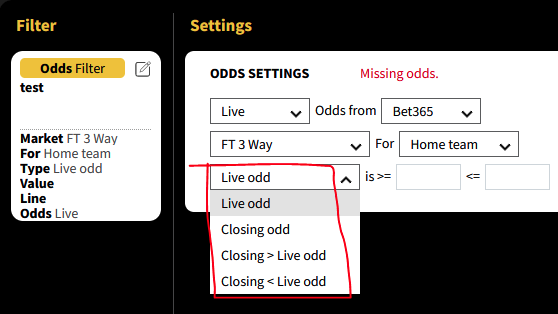
Inoltre, puoi scegliere quali quote nella partita seguire, opening odds, Live odds, or Closing odds.&#x20;

<figure><img src="https://lh4.googleusercontent.com/p54RlBTyydpl8yaUEV2MlCJIUdvvML2_OAUt60tvsR7K6FtYokxU-Hz4fxj04MIRGM0Eu7i0JbileuZ4XTBy9tBYKClEVGM4Re6arfDyYSpOKrwDHNnO6tdiLW_Gyd7SRMTL-nYaHvaqquli7LiHBvhSrjdioXUpBYfYrsw96141eOaNfV3OekDyB6GSNQ" alt=""><figcaption></figcaption></figure>

Inoltre, puoi scegliere di confrontare le quote di chiusura con le quote Live. Ad esempio, puoi selezionare l'opzione per Closing > quote Live, il che significa che le quote di chiusura sono più alte delle quote Live. Ciò può essere utile per individuare le situazioni in cui c'è una grande quantità di scommesse su un determinato mercato e il bookmaker riduce le quote per limitare il rischio.<br>

<figure><img src="/files/xAGHQ1cmsYdBkqAiugyE" alt=""><figcaption></figcaption></figure>

Puoi anche impostare una specifica percentuale di variazione che vuoi che le quote abbiano, ad esempio voler che le quote Live per il favorito siano almeno del 10% più basse delle quote di chiusura.

<figure><img src="https://lh6.googleusercontent.com/Fgiyz1MnhT2_WB32RCgvNKBN4IOZRIhPV7qhy_p7Uoe2sTxrLaaEm74wLJGqhVhIWkr9U3BVkkOwb1m8W9CK2WTBkY8MlK_TIkCtosfOUpOaz6OiFWs8Ii_qSg6Eoi7sSDZK1aa8FwwTB7QWaJGrIfdzNE5VXASZTXHXtZyBwucUOFXNApf30qyytpBzCg" alt=""><figcaption></figcaption></figure>

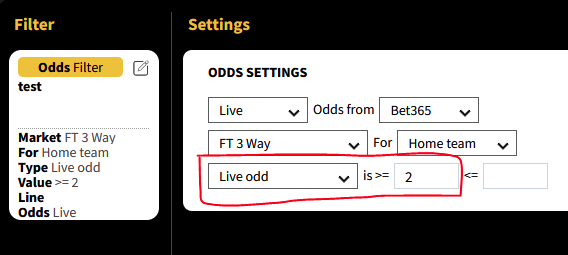
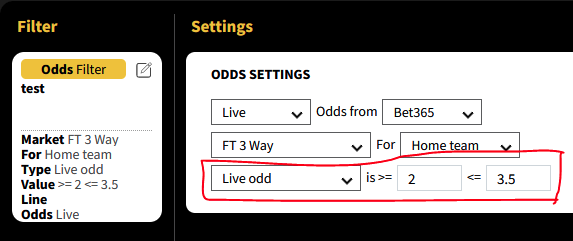
Oppure, puoi impostare valori specifici per le quote, come selezionare quote Live superiori o uguali a 2.00, o entro un determinato intervallo, come essere superiori o uguali a 2.00 ma anche inferiori o uguali a 3.50.\ <br>
<figure><img src="https://lh5.googleusercontent.com/O2OSTwJlUxfvPIm-vaZHvbeE_iJb9Pk1J64iA6_VSJJgCHrvB2aiwB17cRSokDN3gN2gtj9C2twqRkXnBThmrM0AFsAbT0-SH5hKhDWX2NP1iINiYXOZj59VhQ0muluNy7J3BJUQ8fKwJXnDf-U70vjI1aGhFPixKfTCEFlc1TBRq_7NfbqpEqKAcCAHBw" alt=""><figcaption></figcaption></figure>

<br>


---

# Agent Instructions
This documentation is published with GitBook. GitBook is the documentation platform designed so that both humans and AI agents can read, navigate, and reason over technical content effectively. Learn more at gitbook.com.

## Querying This Documentation
If you need additional information that is not directly available in this page, you can query the documentation dynamically by asking a question.

Perform an HTTP GET request on the current page URL with the `ask` query parameter, and the optional `goal` query parameter:

```
GET https://features.sstrader.com/sstrader-tutorials/sstrader-it/creating-new-models/odds-filter.md?ask=<question>&goal=<endgoal>
```

`ask` is the immediate question: it should be specific, self-contained, and written in natural language.
`goal` is optional and describes the broader end goal you are ultimately trying to accomplish on behalf of the user. GitBook uses it to tailor the answer towards what is most useful for that goal.

The response will contain a direct answer to the question and relevant excerpts and sources from the documentation.

Use this mechanism when the answer is not explicitly present in the current page, you need clarification or additional context, or you want to retrieve related documentation sections.